
Build a custom DJ experience by collecting a focused client data packet, locking a minute-by-minute timeline, and mapping music crates to event phases — then share the signed timeline with your DJ before the event date. That single workflow, executed with the right digital tools, is what separates a forgettable playlist from a night guests discuss for years.
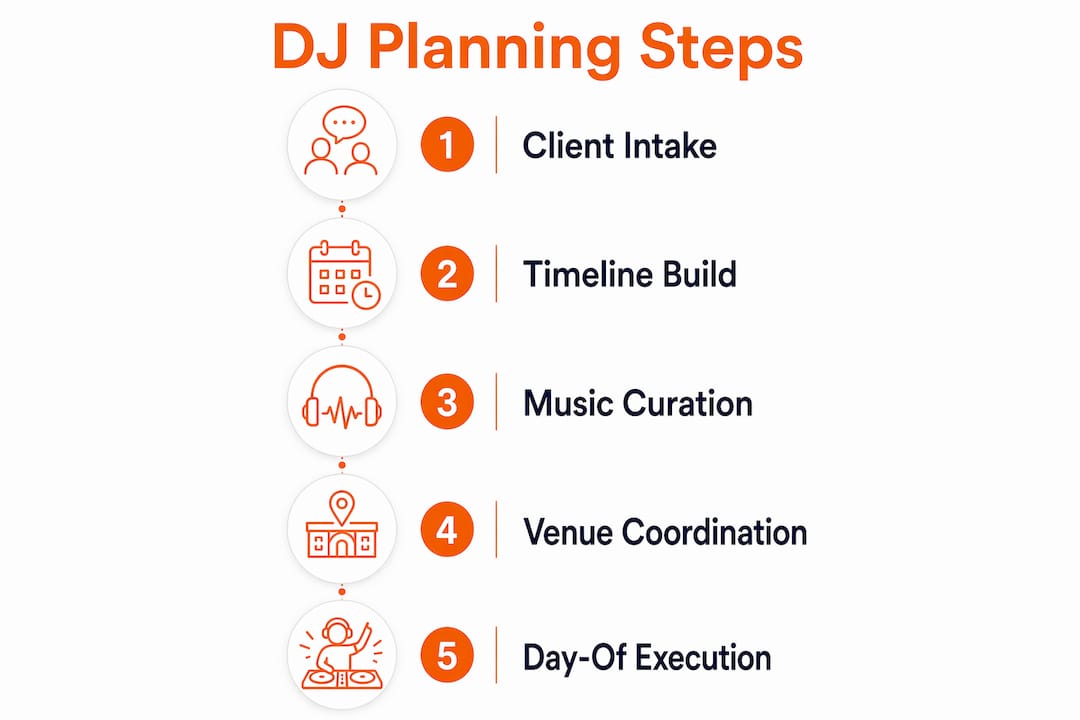
You can begin right now. In the next 30 minutes: send your DJ a digital intake form, draft a skeleton timeline with your key moments, and add your must-play and do-not-play lists. Those three actions alone eliminate the majority of day-of surprises.
Essential elements to collect before planning begins:
- Event date, start time, and venue address
- Load-in time and on-site venue contact
- Guest count and demographic mix
- Must-play list with several tracks and do-not-play list
- Preferred genres, eras, and streaming playlist links
- Key moments with target times (first dance, toasts, grand entrance)
- Desired energy level on a 1–10 scale
- Cultural or traditional music requirements
- Accessibility needs and MC script preferences
- Power and sound specifications at the venue
Table of Contents
- What every DJ needs from clients: the complete data packet
- How do you build a minute-by-minute event timeline?
- How do you build the musical story for your event?
- Which digital tools speed up event DJ planning in Canada?
- How do you prevent last-minute surprises with your DJ?
- What does DJ planning actually cost? Basic vs. premium explained
- How Dj-phoenix builds a custom experience for Canadian events
- Key takeaways
- What actually works on Canadian dance floors
- Dj-phoenix: professional planning for your Canadian event
- Useful sources and planning resources
What every DJ needs from clients: the complete data packet
The intake process is where personalised DJ services either take root or fall apart. A vague brief produces a generic night; a precise data packet produces an event with artistry and intention behind every transition.
Logistical and operational fields
Every client intake form should capture the non-negotiables first: event date and time, venue address, load-in window, the name and mobile number of the on-site contact, and the venue’s power and sound specifications. Guest count matters too, because 80 guests in a ballroom and 80 guests in a loft call for entirely different energy curves and speaker configurations.

Operational details round out this tier: MC script preferences, microphone needs (handheld, lapel, or podium), a vendor contact list (caterer, photographer, planner), and a clear instruction for timeline sign-off. Confirming who has authority to approve last-minute changes on the night is a detail that most intake forms omit and most events later regret.
Music-specific inputs
Must-play lists typically contain 10–15 non-negotiable tracks. That number is deliberate: fewer than ten and the DJ has insufficient direction; more than fifteen and the list begins to constrain the flow rather than guide it. Alongside the must-plays, clients should provide a do-not-play list, links to sample playlists on Spotify or Apple Music, and their preferred eras and genres. Special songs for key moments — processional, first dance, father-daughter dance, last song — deserve their own field, not a footnote.
Experience mapping inputs
Energy level preference (1–10) gives the DJ a calibration point for the arc of the night. Cultural and traditional requirements are equally critical for Canadian events, where multicultural celebrations are the norm rather than the exception. Accessibility notes — guests with hearing impairments, mobility considerations near the dance floor — belong in the intake form, not a last-minute conversation at the venue.
Pro Tip: Build your intake form in Typeform or Google Forms and keep it under 15 fields. A form that takes more than five minutes to complete will be abandoned. Use conditional logic so music-specific questions only appear after the event type is selected — a corporate gala and a Persian wedding require very different follow-up fields.
How do you build a minute-by-minute event timeline?
Converting a data packet into a signed, executable timeline is the most consequential step in the entire custom DJ experience planning process. A locked timeline transforms a list of preferences into a governing document for the evening.
The practical steps
- Draft the skeleton. Open with ceremony or arrival, then block cocktail hour, dinner, formalities, open dance, and send-off. Assign a start time and duration to each phase.
- Allocate fixed-time moments. First dance, toasts, cake cutting, and grand entrance each get a precise clock time, not a range. Precision here protects the photographer, the caterer, and the DJ simultaneously.
- Assign music cues. For each fixed moment, note the track title, artist, and the cue point (full song, fade at 2:30, loop intro). For open-dance phases, note the target energy level and the genre crate.
- Write transition notes. Flag moments where the MC needs a 60-second warning before a key announcement, or where the DJ should drop energy to allow a toast to land cleanly.
- Conduct a day-of venue review. Print the signed timeline, confirm point-of-contact roles with the venue coordinator, and walk the load-in path.
Sample timeline template
| Phase | Start Time | Duration | Music Cue / Energy |
|---|---|---|---|
| Guest arrival | 5:00 PM | 30 min | Ambient/lounge — energy 2–3 |
| Ceremony | 5:30 PM | 25 min | Processional, signing, recessional tracks |
| Cocktail hour | 6:00 PM | 60 min | Jazz, acoustic, world — energy 3–4 |
| Dinner | 7:00 PM | 75 min | Soft contemporary, R&B — energy 3–5 |
| Grand entrance | 8:15 PM | 5 min | Hype track, MC announcement |
| First dance | 8:20 PM | 4 min | Client-selected track |
| Toasts | 8:25 PM | 20 min | Music off or low ambient |
| Open dance | 8:45 PM | 90 min | Ramp 5→8→10, peak, cool-down |
| Last dance / send-off | 10:15 PM | 10 min | Slow closer, exit track |
Day-of checklist before doors open:
- Print two copies of the signed timeline (one for DJ, one for venue coordinator)
- Confirm venue contact name and mobile number
- Walk load-in path and locate power sources
- Test microphones and confirm monitor placement
- Review timeline with coordinator and establish who approves any changes
How do you build the musical story for your event?
Treat music curation as storytelling. Every event has an emotional arc, and the DJ’s role is to score that arc with precision, using energy mapping and purpose-built crates for each phase.
Must-play sizing and placement
Ten to fifteen non-negotiables is the professional standard for a reason. Place high-energy must-plays in the peak dance window (energy 8–10), not during dinner, where a driving hip-hop track will feel jarring against a quiet room. Sentimental must-plays belong at their designated moments. When a client request genuinely does not fit the energy arc of its intended phase, the right move is a brief, honest conversation before the event, not a reluctant drop that kills the floor.
The energy-level scale in practice
The 1–10 energy scale gives both clients and DJs a shared language:
- 1–3: Ambient, background, conversational (guest arrival, dinner service, ceremony pre-show)
- 4–6: Engaged but not yet dancing (cocktail hour, early dinner, transition into formalities)
- 7–8: Dance floor filling, crowd warming (post-formalities, early open dance)
- 9–10: Peak energy, full floor (peak dance window, climactic moments)
A wedding dinner sits at 2–4; a corporate gala’s peak dance window targets 8–9; a private party’s peak can push to 10. For multicultural events, energy mapping must account for genre shifts between cultural segments — a Persian wedding, for instance, may move from traditional Iranian music at a 4 to a high-energy pop/dance set at a 9 within the same evening.
Practical transition approaches
- Match BPM ranges within 10–15 BPM when moving between tracks in the same phase.
- Use genre-bridging tracks (crossover hits that work across two styles) when shifting from one cultural segment to another.
- For ceremonial moments, short edit versions (2:00–2:30) prevent a processional track from overstaying its welcome.
- Instrumental mixes of popular songs allow background music during speeches without lyrics competing with the speaker.
Pro Tip: Build a “bridge crate” of 8–10 tracks that work across multiple genres and energy levels. These are your safety valves when the room shifts unexpectedly — a track that works for both the R&B crowd and the classic rock contingent is worth more than a hundred genre-specific deep cuts.
Which digital tools speed up event DJ planning in Canada?
Choose planning tools that centralise event data, allow client edits in real time, and export playlists directly to DJ software or a USB backup. The right platform removes the administrative friction that turns planning into a reactive email chain.
Features worth prioritising
A client portal with 24/7 access is the single most valuable feature in any DJ planning platform. It replaces insecure email threads with a single authoritative source for the timeline, music requests, and vendor contacts. Beyond the portal, the features that materially reduce planning time are: a timeline builder, playlist import and export (Spotify and Apple Music), calendar sync, e-signature for timeline sign-off, payment integration, and a mobile-responsive interface.
Vibo offers a mobile-first client experience that syncs with both Spotify and Apple Music and exports playlists directly to DJ software, making it a strong fit for DJs who want clients to build their playlists inside a branded app. DJ Intelligence provides a client portal with timeline builders, music request lists, and 24/7 access — a well-established option for DJs managing multiple events simultaneously. DJ Planning Center consolidates event documents, timelines, and communications in one place, reducing the coordination overhead between DJs, clients, and venue staff.
Planning tool feature comparison
| Feature | Why it matters |
|---|---|
| Client portal (24/7 access) | Single source of truth; eliminates lost emails |
| Timeline builder | Converts data packet into a signed, executable plan |
| Spotify / Apple Music sync | Clients build playlists in familiar apps; DJ imports directly |
| E-signature | Locks the timeline and creates accountability |
| Mobile access | Clients and DJs can update on any device, anywhere |
| Playlist export to DJ software | Removes manual re-entry; reduces pre-event prep time |
| Calendar and payment integration | Keeps bookings, deposits, and dates in one system |
Pro Tip: When a streaming service lacks a direct API integration with your planning app (Tidal, for example), use a conversion tool like Soundiiz or TuneMyMusic to migrate the playlist to Spotify or Apple Music first, then import from there. Keep a USB backup of every exported playlist — streaming outages at venues are rare but not unheard of in Canada’s more remote event spaces.
How do you prevent last-minute surprises with your DJ?
Standardise three touchpoints: intake, timeline finalisation, and a day-of review. That cadence, executed consistently, eliminates the reactive scramble that defines underprepared events.
The three required touchpoints
Touchpoint 1 — Intake questionnaire (2–4 weeks before the event):
Send the digital intake form and confirm receipt. Review all music preferences, key moments, and logistical details. Flag any conflicts (a must-play that doesn’t fit the timeline, a venue restriction on volume after 10 PM) and resolve them now, not on the night.
Touchpoint 2 — Timeline sign-off (1 week before):
Share the completed timeline with the client for review and e-signature. A standardised questionnaire plus signed timeline raises client satisfaction and saves hours of reactive fixes on the day. Confirm the vendor contact list and establish who has authority to approve substitutions during the event.
Touchpoint 3 — Day-of review (60–90 minutes before doors open):
The DJ arrives early, walks the venue with the coordinator, and reviews the printed timeline. Confirm point-of-contact roles, test all equipment, and establish the protocol for last-minute music changes.
Sample confirmation email (timeline sign-off)
Handling last-minute music changes
Designate one person (typically the event planner or a designated family member) as the single point of contact for music change requests during the event. All substitution requests go through that person, not directly to the DJ mid-set. This preserves the DJ’s focus and prevents conflicting instructions from multiple guests.
For Canadian events with multicultural guest lists, cultural competence in communication matters as much as musical knowledge. Confirm pronunciation of names for MC announcements, clarify any cultural protocols around specific songs or moments, and note any language preferences for announcements well before the event date.
What does DJ planning actually cost? Basic vs. premium explained
Planning effort drives pricing. More preparation produces better outcomes, and the hours invested in consultation, crate building, venue research, and MC scripting are the invisible work that justifies a premium fee.
The three planning tiers
Basic playback (entry-level):
Minimal pre-event consultation, a general playlist with limited customisation, no signed timeline, and standard equipment. Planning time typically falls in the 2–5 hour range. Suitable for low-stakes events where atmosphere matters less than volume.
Standard DJ service:
A structured intake process, a client-reviewed playlist, a basic timeline, and day-of coordination with the venue. Planning time increases meaningfully as the DJ builds crates specific to the event’s demographic and key moments. Most corporate and private party bookings fall here.
Premium curated experience:
Full consultation, a signed minute-by-minute timeline, phase-specific crate building, MC script rehearsal, venue site research, vendor coordination, and a contingency plan. Premium DJs often spend 10+ hours per event in preparation alone, before they ever arrive at the venue. This tier is the standard for weddings and high-profile corporate events.
Planning hours matter: Typical preparation for a standard event runs 2–5 hours; a premium curated experience regularly demands 10 or more hours of invisible work before the DJ arrives on site.
What clients should ask for in contracts
- Explicit statement of planning hours included
- Confirmation of timeline sign-off process
- Backup equipment policy (second system, backup DJ)
- Clear substitution protocol for last-minute music changes
- Contingency plan for technical failure
For clients, understanding the value of an experienced wedding DJ means recognising that the premium fee covers preparation, not just performance time.
How Dj-phoenix builds a custom experience for Canadian events
Dj-phoenix uses a repeatable, tech-enabled process that mirrors every step in this guide and adapts with particular precision for multicultural Canadian events. The workflow begins at first contact and ends with a signed timeline reviewed on-site with the venue coordinator.
The process follows a clear sequence: a discovery consultation to capture the client’s vision, cultural background, and music preferences; a planning portal session where the timeline and music crates are built collaboratively; a pre-event confirmation call one week out; and a day-of arrival 90 minutes before doors open to review the signed timeline with the venue team. Every event document — timeline, playlist, vendor contacts — lives in one centralised location, accessible to the client at any time.
Dj-phoenix has delivered this calibre of preparation for prestigious clients including Mercedes-Benz and FW Sports, events where the margin for error is zero and the expectation for sophistication is absolute. The same rigour applies to every wedding, private party, and corporate gathering on the calendar.
For a recent multicultural wedding in the Greater Toronto Area, the planning process included a bilingual MC script, a phase-specific crate structure that moved from traditional Persian music during the ceremony to a high-energy contemporary set for the open dance, and a contingency playlist exported to both the planning app and a USB backup. The timeline was signed one week before the event and reviewed with the venue coordinator on arrival.
Explore Dj-phoenix’s performance gallery to see the artistry and pedigree behind every event.
Key takeaways
A well-executed custom DJ experience planning process requires three things done in sequence: a precise client data packet, a signed minute-by-minute timeline, and phase-specific music crates built before the event date.
| Point | Details |
|---|---|
| Start with the data packet | Collect must-play/do-not-play lists, energy level, key moments, and venue specs before any planning begins. |
| Lock the timeline early | A signed, minute-by-minute timeline reviewed with the venue coordinator eliminates day-of surprises. |
| Map music to phases | Build crates for each event phase (cocktail, dinner, peak dance) using the 1–10 energy scale as your guide. |
| Use digital planning tools | Platforms like Vibo and DJ Intelligence centralise documents, enable Spotify/Apple Music sync, and export playlists to DJ software. |
| Dj-phoenix handles it all | Dj-phoenix delivers the full process — consultation, timeline building, music curation, and on-site coordination — for Canadian events. |
Five immediate actions:
- Send the digital intake form to your client or DJ today.
- Draft a skeleton timeline with your key moments and target clock times.
- Build your must-play and do-not-play lists (10–15 tracks in the must-play list is standard).
- Confirm your planning tool integrates with Spotify or Apple Music and export a backup playlist to USB.
- Schedule the timeline sign-off call for one week before the event and confirm who approves last-minute changes on the night.
What actually works on Canadian dance floors
The templates in this guide are sound, but a few things I have observed across Canadian events consistently outperform what any checklist can capture.
Arrival time is the most underrated variable in the entire process. Ninety minutes before doors open is the minimum; for a venue you have not worked before, two hours gives you time to discover the loading dock is on the opposite side of the building from the power panel, or that the ceiling height requires repositioning the speakers entirely. No amount of advance research fully replaces standing in the room.
MC script rehearsal is where most DJs cut corners and most events lose their polish. Read the script aloud, time the announcements, and confirm the pronunciation of every name with the client or a family member. A mispronounced name at a wedding is the one moment guests remember above all others.
Accessible seating near the dance floor, but not directly in front of the speakers, is a detail that matters deeply to guests with hearing sensitivities and is almost never addressed in standard planning forms. Adding it to your intake questionnaire takes 30 seconds; the goodwill it generates is disproportionate.
The most common mistake I see is treating the open-dance set as a fixed playlist rather than a live read. The crates are your preparation; the room is your instruction. When the floor empties after three consecutive tracks in the same genre, that is not a guest problem — it is a cue to shift. Build your bridge crate, trust your read, and move.
One final note: contingency planning is not pessimism, it is professionalism. Export every playlist to USB before you leave for the venue. Test your backup system at home, not in front of 200 guests. The DJs who never need their backup plan are the ones who always have one.
Dj-phoenix: professional planning for your Canadian event
Every step in this guide — intake, timeline building, music curation, venue coordination, and day-of execution — is exactly what Dj-phoenix delivers for clients across Canada. The difference is that you do not have to manage the process yourself.
When you book Dj-phoenix, you receive a full planning consultation, a signed minute-by-minute timeline, phase-specific music curation tailored to your guest demographics and cultural background, and on-site coordination from arrival to the final track. For multicultural events, the planning process includes bilingual MC scripting and culturally specific music curation that honours your traditions without sacrificing the energy of the dance floor.
- Full consultation: discovery call, intake form, and timeline review
- Music curation: must-play placement, energy mapping, and phase-specific crates
- Day-of coordination: 90-minute early arrival, venue review, and signed timeline execution
View the performance gallery to see the calibre of events Dj-phoenix has delivered, or explore the wedding packages to find the planning tier that fits your event. To check availability and begin your consultation, visit dj-phoenix.com.
Useful sources and planning resources
The following resources back the practical claims in this guide and are worth bookmarking as you build your planning process.
| Resource | What it covers |
|---|---|
| DJ Intelligence | Client portal features, timeline builders, and 24/7 event document access |
| Vibo DJ planning app | Mobile-first client collaboration, Spotify/Apple Music sync, and playlist export to DJ software |
| DJ Playbook — event preparation | 7-day pre-event checklist, preparation hour benchmarks, and day-of arrival protocol |
| DJ Playbook — pre-event consultation | Standardised questionnaire design and timeline sign-off best practices |
| DJ Planning Center | Centralised event document management for DJs and clients |
Dj-phoenix planning resources:
- Wedding DJ timeline best practices — detailed timeline framework for weddings
- Role of DJ consultation before parties — sample intake questions and consultation flow
- Multicultural wedding music traditions — music planning for multicultural Canadian celebrations
- Inclusive event entertainment checklist — accessibility and inclusion guidance for event planners
- Performance gallery — live event footage and mixes from Dj-phoenix